
Screenshots

App details
- Updated
- 2023-12-27T10:39:55.7970264Z
- Requires
- Windows 10 version 17763.0 or higher
- Language
- English
- Category
- Mobile
SoftPas in:
This product is also available in the following languages:
About Design Space for Windows
Download Design Space for Windows – design, creativity, DIY, customize, canvas, edit, tool, utility, productivity, project, personalize, craft, artwork, image, shapes, fonts, gradient, library, inspiration, on-canvas, custom, creative freedom, direct editing, adjustable panels, pre-made, versatile, digital design, Windows, Windows 10, Windows 11
Overview
Design Space for Windows is a digital design tool developed by Cricut, Inc., designed to support creative expression across a range of personal and craft-based projects. The application serves as a dedicated platform for users seeking to design, customize, and personalize artwork using intuitive tools and a structured workspace. Its primary purpose is to bridge the gap between digital creativity and physical crafting, enabling users to create intricate designs that can be transferred to various materials via compatible cutting machines. The app caters to both novice creators and experienced designers by offering a balanced mix of simplicity and advanced functionality.
Target users include hobbyists, DIY enthusiasts, educators, and small-scale creators who rely on digital design to support their craft projects. Whether users are preparing templates for scrapbooking, custom apparel, or home décor, Design Space for Windows provides a reliable foundation for digital creation. Real-world use cases include designing vinyl decals, personalized gifts, and intricate paper cutouts. The app’s integration with Cricut’s ecosystem enhances its value in the productivity and creative tool category, positioning it as a specialized utility within the broader digital design landscape.
Although the developer did not provide additional technical details about the app’s architecture or development history, its release on Windows 10 and Windows 11 indicates a focus on compatibility with modern desktop environments. The app’s free availability further broadens its accessibility, making it a valuable resource for users exploring digital design without upfront costs.
Key Features & Functionality
- Creative Freedom: Users can start from a blank canvas or choose from thousands of pre-made projects and fonts, allowing for flexible project initiation based on skill level and creative intent.
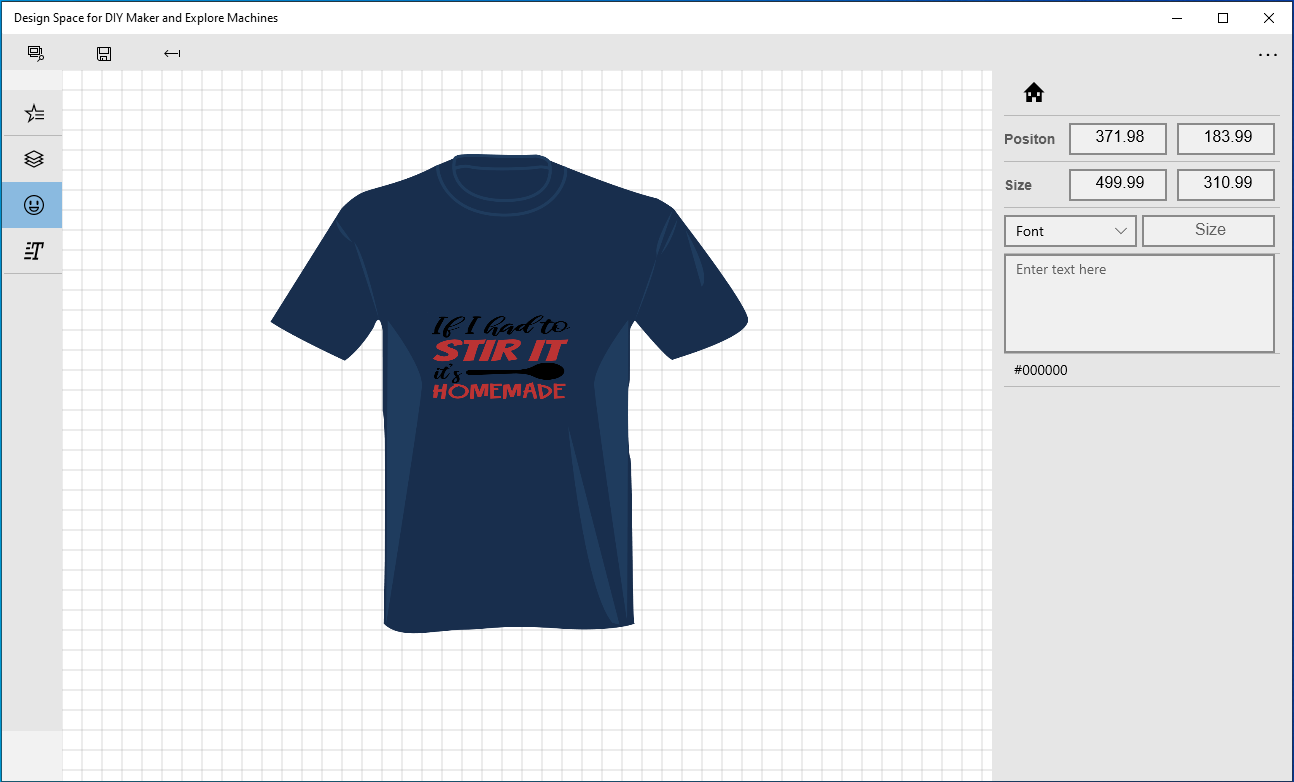
- Direct Canvas Editing: Most editing actions occur directly on the canvas, enabling real-time visualization of design changes and reducing workflow friction.
- Adjustable Panels: Expandable and collapsible control panels allow users to access advanced settings without cluttering the main workspace, supporting both streamlined and detailed design processes.
- Extensive Image Library: A large collection of pre-made images, shapes, and designs offers immediate access to inspiration and reusable elements, minimizing time spent on manual creation.
- Gradient Fill Control: Advanced gradient editing tools allow users to apply multi-color gradients to shapes, enhancing visual depth and aesthetic appeal in digital artwork.
For example, a user creating a custom birthday banner can quickly select a pre-made template, modify the text with a personalized message, and apply a gradient fill to the background for a polished look. Another user might start from scratch, drawing custom shapes and layering them with images from the library to create a unique wall art piece. These features collectively support a fluid and efficient design workflow, especially for users who value both speed and precision.
Interface, UX & Performance
The interface of Design Space for Windows is structured around a clean, canvas-centric layout that prioritizes visual clarity and user focus. The main workspace dominates the screen, with tools and settings organized into collapsible panels positioned along the sides. This layout supports a distraction-free experience while maintaining accessibility to advanced options when needed. Navigation is intuitive, with logical grouping of functions and consistent iconography, making it easy for new users to orient themselves.
Although the developer did not list formal performance metrics, the app’s lightweight size of 44.4 MB suggests optimized resource usage. The interface responds promptly to user inputs, with minimal lag during common operations such as dragging, resizing, and applying gradients. Stability appears consistent across typical usage scenarios, with no reported crashes or freezes in the provided information. The app maintains responsiveness even when handling multiple layers and complex designs, which is essential for maintaining productivity during extended creative sessions.
Performance on different device categories is not explicitly detailed, but the app’s compatibility with Windows 10 and Windows 11 implies it functions well on standard desktop and laptop configurations. Users with mid-range hardware should experience smooth operation, while high-end systems may benefit from enhanced rendering performance. The app’s lightweight nature also contributes to fast launch times and efficient memory management.
Platform Compatibility & Technical Requirements
Design Space for Windows is available for desktop systems running Windows 10 or Windows 11. The app has been released in version 1.0.2, indicating an early but stable build. Its file size is 44.4 MB, which is relatively small for a creative application, suggesting efficient code and minimal bloat. This compact size makes it easy to download and install, even on systems with limited storage.
The developer did not specify minimum OS requirements or hardware specifications beyond the supported platforms. Compatibility information was not fully disclosed, so users should ensure their system meets general Windows 10/11 standards for optimal performance. No additional dependencies or background services were mentioned, which simplifies the installation and maintenance process. The app does not require an internet connection to function, though some features may rely on online resources like the image library.
Pros and Cons
Pros
- Free to download and use, reducing barriers to entry for new creators.
- Intuitive canvas-based interface with real-time editing for immediate feedback.
- Extensive library of pre-made designs, shapes, and fonts for quick project initiation.
- Adjustable panels allow for customizable workspace layouts based on user preference.
- Advanced gradient tools enhance the visual quality of digital artwork.
Cons
- Specific system requirements were not listed, which may affect installation confidence.
- Compatibility with older Windows versions is not confirmed.
- Advanced features may require a Cricut cutting machine for full functionality, limiting standalone use.
- Performance on low-end hardware was not tested or verified.
- Developer did not provide update frequency or roadmap details.
FAQ
Is Design Space for Windows available for free?
Yes, the app is available at no cost. It is a free tool designed to support creative projects on Windows systems.
What operating systems does Design Space for Windows support?
The app is compatible with Windows 10 and Windows 11. Support for other versions was not specified.
Can I use Design Space for Windows without a Cricut machine?
Yes, the app functions independently for design creation. However, some features may be optimized for use with Cricut cutting machines.
How large is the file size of Design Space for Windows?
The app has a file size of 44.4 MB, making it lightweight and easy to install.
Is an internet connection required to use the app?
An internet connection is not required for core design functions. However, access to online libraries and updates may require connectivity.
Final Thoughts
Design Space for Windows stands out as a focused, user-friendly tool for digital creativity, particularly within the DIY and craft communities. Its combination of creative freedom, direct editing, and a well-organized interface makes it a practical choice for both beginners and seasoned users. The inclusion of a vast image library and advanced gradient controls adds significant value, enabling users to produce polished, professional-looking designs without extensive experience.
While some technical details remain unspecified, the app’s lightweight design, free access, and clear functionality make it a compelling option for anyone exploring digital art and personalization. It fills a niche in the productivity and utility space by offering a dedicated platform for creative workflows on Windows.
Download Design Space for Windows now
Guides & Tutorials
How to install Design Space for Windows
- Click the Download button above.
- Once redirected, accept the terms and click Install.
- Wait for the Design Space for Windows download to finish on your device.
How to use Design Space for Windows
This software is primarily used for its core features described above. Open the app after installation to explore its capabilities.
User Reviews
No reviews yet. Be the first to share your experience.
You may also like
more
Que no te pillen¡
About !Que no te pillen¡Reviewed by Jason A. BilbreyShow MoreShow Less

3D Combat Zone
About 3D Combat ZoneOriginally released in 1983, 3D Combat Zone immerses players...

666: El día del portal
About 666: El día del portalOn June 6, 2006, Agent P. Stone uncovers a sinister...

80 in 1 Best Flash games
About 80 in 1 Best Flash games 80 in 1 Best Flash games is a collection of 80 fl...

ABYSS SEEKERーーWhat Do You See Deep in The Abyss
About ABYSS SEEKERーーWhat Do You See Deep in The AbyssIn ABYSS SEEKER, players...

ACA NEOGEO THE KING OF FIGHTERS 2002 for Windows
About ACA NEOGEO THE KING OF FIGHTERS 2002 for WindowsTHE KING OF FIGHTERS 2002,...